IT Audit for SMEs: The 10-Point Checklist
Network, backups, security and licences: ten points to scope when assessing an SME IT environment.

Why audit your IT?
Audit duration and outputs depend on the estate, sites, interviews and authorised technical checks. The proposal must define the assessment and reporting scope.
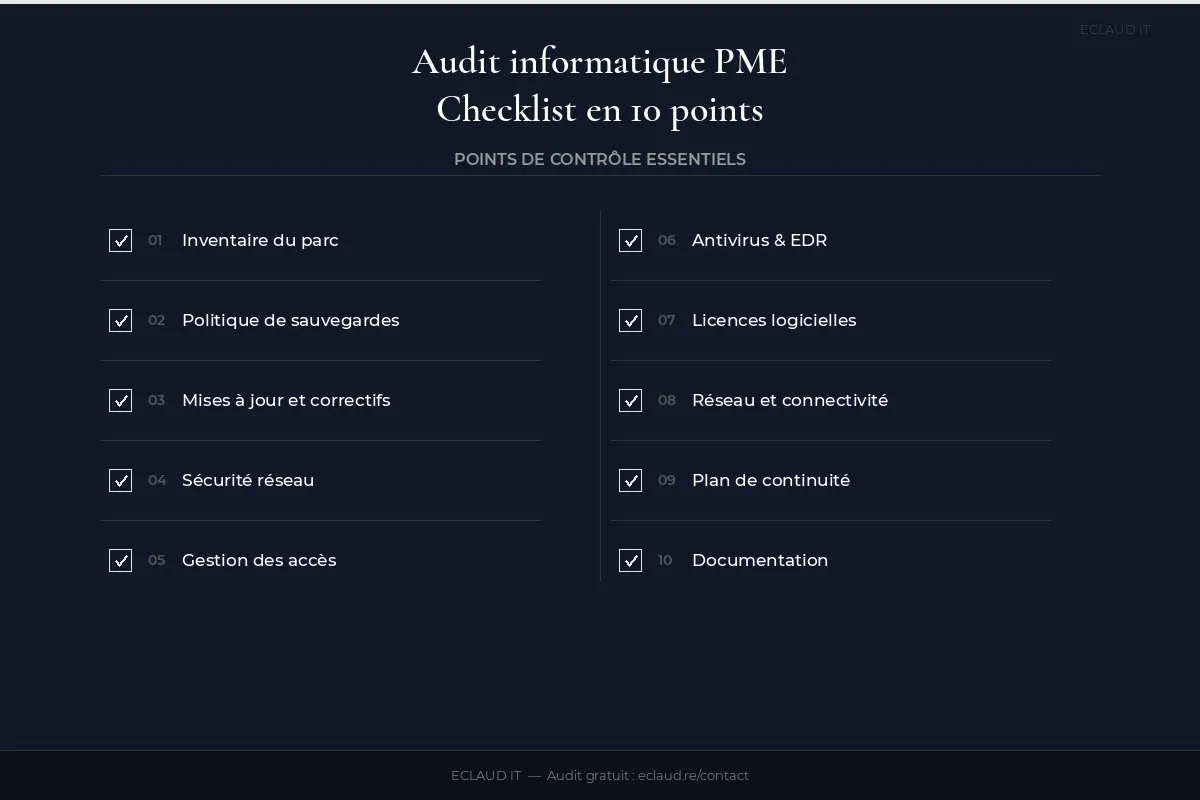
The following checklist presents ten points that can be included in an audit. The actual checks, deliverables and price are confirmed before work begins.
According to the ANSSI (France’s national cybersecurity agency), 60% of cyberattacks exploit vulnerabilities known for over 2 years — flaws that an audit can detect before they’re exploited (cyber.gouv.fr, IT Hygiene Guide).
The checklist
1. Hardware inventory
How many workstations, servers, printers, switches, Wi-Fi access points? How old are they? What condition? A workstation over 5 years old is both a breakdown risk and a security vulnerability.
Why it’s critical. Without an up-to-date inventory, you’re managing the unexpected. An unlisted server failure can delay escalation, diagnosis and replacement because ownership and dependencies are unknown.
What we look for: a spreadsheet or management tool (Snipe-IT, OCS Inventory) with purchase date, serial number, and OS version for each piece of equipment. If you don’t have one, it’s the first deliverable of the audit.
2. Backup policy
What’s being backed up? Where? How often? And most importantly: when was the last restore test? The 3-2-1 rule is the bare minimum.
Why it’s critical. An untested backup is not a backup — it’s an illusion. We’ve worked with SMEs whose backup NAS had failed 6 months earlier without anyone noticing. When a ransomware incident hit, nothing remained. The 3-2-1 rule (3 copies, 2 different media, 1 off-site) is the minimum standard; the 3-2-1-1-0 rule adds an immutable copy and zero restore errors.
What we test: we request a restore of a test file or directory from the backup. If it takes more than 20 minutes or fails, the item is flagged red.
3. Updates and patches
Windows, Office, network firmware, antivirus: everything must be current. A workstation left unpatched for 3 months is an easy target.
Why it’s critical. The WannaCry ransomware (2017) infected 200,000 machines across 150 countries by exploiting a Windows vulnerability that had been patched two months earlier. The majority of victims simply hadn’t applied the patch. This scenario remains relevant: in 2024, the ANSSI (France’s national cybersecurity agency) handled 4,386 cyberattacks, a significant proportion linked to unpatched systems.
What we look for: an update deployment history via WSUS, Intune, or a patch management solution. The absence of this history is itself a warning sign.

4. Network security
Firewall in place? Last firmware update? Filtering rules documented? VPN configured for remote access? The firewall is the first line of defence.
Why it’s critical. A firewall left unupdated for 18 months can expose known, published vulnerabilities — attackers actively scan for them using automated tools. We’ve seen SMEs in Reunion Island whose firewall was the ISP’s consumer-grade router, with no filtering rules whatsoever. The entire internal network was exposed.
What we check: firmware version, inbound/outbound filtering rules, VPN access, network segmentation (guest Wi-Fi separated from the work network), and the presence of a connection audit log.
5. Access management and passwords
Password policy in place? MFA enabled? Former employees’ accounts deactivated? Unrevoked access is the leading cause of internal compromise.
Why it’s critical. The Verizon Data Breach Investigations Report 2024 indicates that 68% of breaches involve a human element — a large proportion through compromised credentials or unrevoked access. A former employee whose Microsoft 365 account hasn’t been deactivated can access emails, SharePoint files, and client contacts for months.
What we audit: the list of active accounts vs. the list of current employees. Every orphaned account is a vulnerability. We also verify that MFA is actually enabled — not just “planned.”
6. Antivirus and EDR
Up-to-date security solution on every workstation? Alerts being monitored and acted upon? An antivirus without centralised management is useless.
Why it’s critical. An antivirus installed but with alerts going to an inbox nobody checks is like a fire alarm wired into a locked cupboard. Centralised management — via an EDR console or SIEM — reveals that a workstation blocked 15 suspicious access attempts last night. Without it, that information is lost.
What we recommend: Microsoft Defender for Endpoint (included in Business Premium) or CrowdStrike Falcon for SMEs requiring a higher level of protection. Antivirus alone is no longer sufficient — EDR analyses behaviours, not just signatures.
7. Software licences
Are all licences valid? Perpetual Office vs. Microsoft 365? Line-of-business software up to date? An expired licence means no security updates.
Why it’s critical. Office 2016 and 2019 stopped receiving security updates in October 2025. An SME still running those versions is exposed to known vulnerabilities with no available fix. Not to mention compliance risk: using software without a valid licence exposes the company to legal sanctions — the BSA (Business Software Alliance) conducts regular audits across Europe.
What we map: active licences, expiry dates, installed versions vs. supported versions. We also identify unsupported line-of-business software — an often-underestimated risk.
8. Network and connectivity
Sufficient internet speed? Professional Wi-Fi or consumer-grade router? Managed switches or not? Network quality determines the entire team’s productivity.
Why it’s critical. An SME of 15 people on Teams video calls with simultaneous file transfers needs at least a 100 Mbps symmetrical connection — not a residential 20 Mbps shared plan. Consumer Wi-Fi (ISP router) can’t handle the load, doesn’t manage QoS, and doesn’t segment networks. The result: choppy video calls, failed cloud backups, and wasted time for everyone.
What we measure: actual throughput (not contractual speed), latency, packet loss rate, Wi-Fi signal quality across work areas, and presence of managed equipment (switches, Ubiquiti or Cisco Meraki APs).
9. Business continuity plan
What happens if the main server goes down? If the building is inaccessible? If ransomware encrypts the entire network? A continuity plan, even a simple one, is essential.
Why it’s critical. Flooding, cyclones or loss of site access can interrupt normal operations. A continuity plan should identify critical activities, remote-work options, contacts and restoration priorities using the organisation’s own tolerances.
What we establish: RTO (maximum tolerable downtime) and RPO (maximum tolerable data loss) for critical systems. These two figures guide everything else — backup frequency, redundancy investment, and acceptable degraded-mode operations.
10. Documentation
Is the infrastructure documented? Network diagram, admin passwords, restore procedures? If the person who “knows everything” is absent, the business grinds to a halt.
Why it’s critical. The “bus factor” — the risk that critical information lives in only one person’s head — is one of the most widespread vulnerabilities in SMEs. An internal IT technician who changes roles, falls ill, or goes on holiday without having documented admin access can paralyse a business. We’ve seen cases where admin passwords were written on a sticky note under the keyboard. Documentation is your infrastructure’s memory.
The minimum: an up-to-date network diagram, a password manager (Bitwarden, KeePass), and tested restore procedures.
When should you conduct an IT audit?
Certain situations make an audit particularly urgent — beyond the standard annual best practice.
After a security incident. A ransomware attack, a successful phishing attempt, a compromised mailbox: even if the incident seems contained, an audit reveals how the attacker got in and helps close the gaps. Without it, recurrence is likely.
Before growth or restructuring. Hiring 5 people? Opening a second office? Outsourcing part of your IT? This is the time to have a documented and healthy baseline — not to manage growth on a fragile infrastructure.
When changing IT providers. Taking over a client’s infrastructure without a prior audit means signing blind. For you, switching providers without a handover audit means letting critical information leave with the old one.
Audit frequency depends on risk, change, contractual duties and applicable requirements. Monitoring between audits only exists where a maintenance or managed IT contract explicitly includes it.
What does the IT audit report contain?
At the end of the audit, you receive:
- An up-to-date inventory of your hardware
- A map of priority risks, if included in the agreed scope
- Recommendations and estimates defined by the reporting brief
Interested? Request an audit scoping discussion. The estate, authorised tests, deliverables, schedule and quote are confirmed before work starts.
See also: Why outsource IT maintenance, 5 signs it’s time to switch to managed IT, our SME backup guide, the secure remote working guide, and our Microsoft 365 migration guide.
Frequently asked questions
How long does an IT audit take?
Duration depends on the number of sites and systems, the tests authorised, stakeholder availability and the expected report. The intervention and delivery schedule are confirmed in the proposal.
Is an IT audit free?
The initial review, audit scope, deliverables and price are confirmed before work starts. Compare providers using the same authorised tests, reporting requirements and remediation boundaries.
How often should you audit your IT infrastructure?
Frequency depends on risk, change, incidents and applicable obligations. Any monitoring between audits depends on the actual contractual scope.
What happens after the audit?
You receive a structured report with green items (compliant), amber items (to monitor), and red items (to address as a priority). Each red item comes with a concrete recommendation and an indicative cost estimate. It’s up to you to decide what to prioritise. If you’d like us to handle the remediation, we provide a quote. Otherwise, the report is yours — you can share it with another provider.
Does the audit cover cybersecurity as well?
Yes, security is at the heart of the audit: access management, updates, antivirus, firewall, backups. We base our approach on the ANSSI IT Hygiene Guide (France’s national cybersecurity framework), which defines 42 fundamental rules for organisations. The audit covers the most critical points for an SME, without the complexity of an ISO 27001 compliance audit.