Data backup for SMEs: the complete 3-2-1 guide
Local backup, cloud, hybrid: what backup plan does your SME need? The 3-2-1 rule, frequency, restore testing — everything you need to know.

The golden rule: 3-2-1
If you only take away one thing from this article, let it be the 3-2-1 rule:
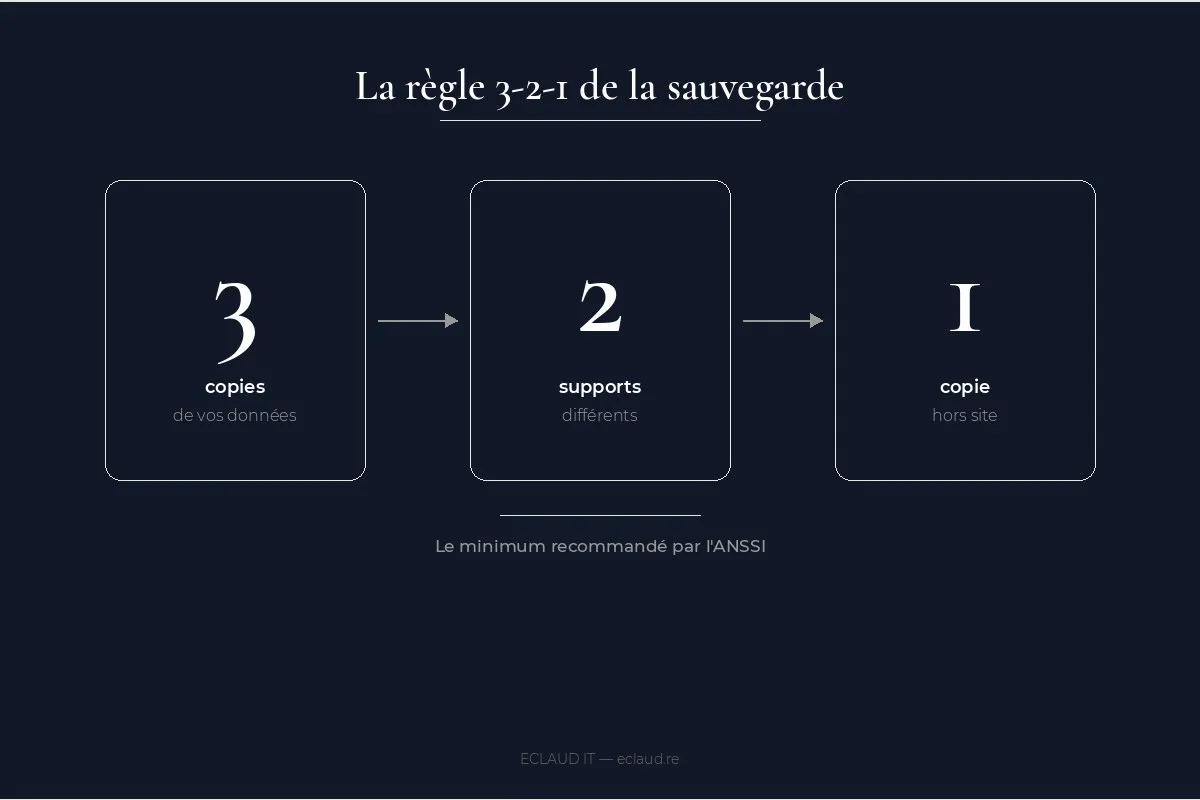
- 3 copies of your data
- on 2 different media types (NAS + cloud, for example)
- with 1 offsite copy (external cloud or remote location)
This rule, recommended by ANSSI (France’s national cybersecurity agency), protects against three common scenarios: hardware failure, ransomware encrypting the local network, and physical disaster (fire, water damage).
Many SMEs think they have a backup strategy because they own a NAS. A NAS is a starting point — not a strategy. The 3-2-1 rule is a baseline, not an ideal. Easy to remember, but implementing it properly requires serious thought about each type of data and each loss scenario.
Why local backup alone doesn’t protect your SME
A Synology NAS in the office is a good start. But if ransomware encrypts the entire network, the NAS gets hit too. Local backup is useful for quick recovery (an accidentally deleted file, a workstation failure), but it doesn’t protect against targeted attacks.
Modern ransomware scans network drives and encrypts everything it finds — including NAS shares mapped as network drives. If your NAS is accessible from workstations via a mapped network drive (Z: or similar), it’s vulnerable. The solution: backups isolated from the main network — immutable snapshots, media disconnected after each backup cycle, or cloud copies with deletion protection.
A properly configured NAS with Synology snapshots and immutable protection enabled offers better resilience. But this requires explicit configuration — it’s not the default behaviour.
Cloud backup: the essential complement
Acronis Cyber Protect, Veeam, or native Microsoft 365 backup: the cloud provides the offsite copy. Benefits: encryption in transit and at rest, long-term retention, granular recovery (a single file, a mailbox, an entire server).
Average cost: 3 to 8 EUR per workstation per month for a managed solution.
A point often overlooked: Microsoft 365 does not back up your data. Microsoft ensures platform availability — not recovery of your emails deleted beyond 30 days, nor restoration of SharePoint files accidentally overwritten. Microsoft’s retention policy is clear: data backup responsibility lies with the business, not the vendor. A third-party solution like Acronis Backup for Microsoft 365 or Veeam Backup for Microsoft 365 is necessary for real protection.
RPO and RTO: two concepts to understand before choosing your solution
Two metrics define what you can accept in the event of an incident — and they must be established before any technical decision:
RPO (Recovery Point Objective) — How far back in time can you go? If your backup runs daily and an incident occurs at 5pm, you lose a full day’s work. An RPO of 4 hours means you cannot lose more than 4 hours of data. For business-critical databases, an RPO of 15 to 30 minutes is often the norm.
RTO (Recovery Time Objective) — How long to get back up and running? If your server goes down and recovery takes 8 hours, your RTO is 8 hours. For an SME processing orders in real time, that’s unacceptable. For a small business, an RTO of 4 to 24 hours is often realistic depending on the solution chosen.
These two figures must be defined before choosing a solution — not after. They determine backup frequency, technology type (full image, incremental, snapshot), and budget.
The ransomware scenario: what actually happens
An employee opens an attachment. Within 20 minutes, every file on the server and shared drives is encrypted. The message appears: “Pay 15,000 EUR in Bitcoin or your data is gone.”
This is the typical ransomware attack scenario for an SME. ANSSI (France’s national cybersecurity agency) reports hundreds of ransomware attacks in France each year, with SMEs and local government bodies as primary targets. The average cost of an attack for an SME exceeds 30,000 EUR — including the ransom (when paid), reconstruction costs, and business downtime.
Without an isolated and tested backup, options are limited: pay up or rebuild from scratch. With an immutable offsite backup from the previous day, the situation changes dramatically — restoration in a few hours, no negotiating with attackers.
Backup is the only protection that works after an attack. Antivirus software, firewalls, training — all of these reduce risk, but nothing is 100%. Backup ensures that even if everything else fails, you can recover.
ANSSI figures confirm the scale of the problem: in its 2024 Cyber Threat Overview, the agency reports a 30% increase in ransomware attacks compared to 2023, with SMEs as primary targets. The median cost of an attack for a French SME reaches 50,000 EUR when including business downtime, system rebuilding, and commercial losses. 60% of SMEs hit by a major cyberattack go out of business within 18 months (source: French Senate, cybersecurity report, 2024).
Example scenario: an accounting firm
The following hypothetical scenario illustrates the dependency between local and offsite copies.
An accounting firm stores client files on a NAS, with a backup on an external hard drive that remains connected. There is no isolated cloud copy, no restore testing and no backup of Microsoft 365 mailboxes.
If a staff member opens an infected attachment, ransomware may encrypt both the NAS and the connected drive because both are accessible from the network. The recovery outcome then depends on whether a separate clean copy exists.
What was missing:
- An offsite (cloud) copy isolated from the local network
- Immutable snapshots on the NAS (a feature available but never enabled)
- A restore test that would have revealed the external drive was not disconnected after each backup cycle
- A backup of Microsoft 365 data (emails, calendars, contacts)
What a 3-2-1 plan changes: an independent copy gives the recovery team another restoration path. Actual recovery time, data loss and cost depend on the tested architecture, data volume and contractual RPO/RTO.
Any organisation handling sensitive client data should document its backup copies, retention, access controls, restoration procedure and evidence from scheduled tests before an incident occurs.
GDPR and backups: what the law actually requires
The GDPR does not mandate a universal backup retention period — but it strictly regulates the storage of personal data. For an SME, this has direct consequences on backup policy.
Limited retention periods: you cannot store personal data indefinitely. If your backups contain client, HR, or patient data, the retention policy must align with your legal obligations. An accounting firm keeping payroll backups for 10 years without a documented policy faces GDPR risk. A medical practice backing up patient records without a defined retention period is in breach.
Backup security: the CNIL (France’s data protection authority, equivalent to the ICO in the UK or data protection agencies in other EU countries) requires that personal data is protected — including in backups. Mandatory encryption, restricted access, traceability of restorations. A provider managing your backups must be able to sign a DPA (Data Processing Agreement).
Data location: if you use cloud backup, verify that data is hosted within the European Union. US-based solutions (AWS, Azure, Google Cloud) offer EU regions — but the choice must be explicit. Hosting outside the EU without adequate contractual safeguards (Standard Contractual Clauses) may constitute a non-compliant data transfer.
Right to erasure: a client or employee can exercise their right to erasure (Article 17 GDPR). If their personal data appears in your backups, you must be able to document why it’s still there (legal retention obligation, for example) or delete it. In practice, backups are often exempt from immediate erasure if a documented, time-limited retention policy is in place.
Breach notification: in the event of a data leak via a compromised backup (stolen external drive, poorly secured cloud backup), GDPR requires notification to the relevant supervisory authority within 72 hours and to affected individuals if the risk is high. A managed IT services provider integrates this procedure into its incident response plan.
These obligations are not theoretical constraints: they have a direct impact on your choice of media, the location of your cloud data (EU or non-EU), and your retention periods. An IT audit should cover this compliance aspect when it is included in the agreed scope.
How do you know if your backups actually work?
43% of SMEs that suffer major data loss never reopen (source: UK Chamber of Commerce, 2024). Yet most businesses never test their backup restores.
For an ECLAUD IT managed IT services contract or IT maintenance agreement, the restore-test scope, frequency, evidence and reporting recipients are defined in the contract.
Why test when you can see backups running every night? Because a backup can complete without errors and still be unusable. Corrupted files, incomplete backup sets, versions incompatible with the target system — there are many potential failure points. The only way to know if a backup works is to restore it to a test environment and verify that the data is readable and consistent.
Quarterly testing is the minimum. For critical data (business databases, accounting files), monthly testing is preferable.
Sample backup plan for a 20-workstation SME
| Component | Solution | Frequency |
|---|---|---|
| Workstations | Image + file backup | Daily |
| File server | Synology NAS + cloud replication | Real-time |
| Microsoft 365 | Acronis Backup for M365 | Daily |
| Business database | Snapshot + SQL export | Twice daily |
| Restore testing | Simulated full restore | Quarterly |
This table is a starting point. Frequencies vary depending on your data volume, target RPO, and budget. For a business with high transaction volumes, database snapshots may be hourly.
Where to start?
An infrastructure assessment can identify critical data and map existing backups. Its duration, price, deliverables and any 3-2-1 implementation work must be confirmed in advance. Our SME IT audit checklist outlines topics that may be included, such as backup policy.
See also: Managed IT for SMEs — 5 signs it’s time to make the switch, Outsourcing IT maintenance and Secure remote work: the IT guide for SMEs
Frequently asked questions
What is the ideal backup frequency for an SME?
Frequency depends on your RPO — the maximum acceptable data loss. For most SMEs, daily backup of workstations and files, combined with snapshots every 2 to 4 hours for business databases, covers the essentials. If you process orders or financial data in real time, near-continuous replication is preferable. The key: define the RPO before choosing the frequency, not the other way around.
Is native Microsoft 365 backup sufficient?
No. Microsoft guarantees platform availability, not data recovery. Deleted emails are recoverable for 30 days, overwritten SharePoint files according to a limited versioning policy. Beyond that, without a third-party solution (Acronis, Veeam, Spanning), your data is not recoverable. The rule applies to all SaaS: the vendor is not your backup provider.
How much does a managed backup solution cost for an SME?
The price depends on data volume, retention, immutability, hosting location, Microsoft 365 coverage, monitoring hours, restore-test frequency and RPO/RTO. The proposal must state the recurring price, setup work, included tests and exclusions for the selected scope.
What should you do in case of a ransomware attack?
First step: immediately isolate infected machines from the network — disconnect network cables and disable Wi-Fi. Do not pay the ransom before evaluating your restoration options. Contact your IT provider urgently to identify the last clean backup. If you have an immutable offsite backup, restoration can begin within hours. Without a backup, options are limited to decryption tools (rare and specific) or a complete rebuild. Report the incident to ANSSI (France’s national cybersecurity agency) via their online form — it’s recommended and confidential. In other countries, contact your national cybersecurity authority (NCSC in the UK, CISA in the US, BSI in Germany, etc.).